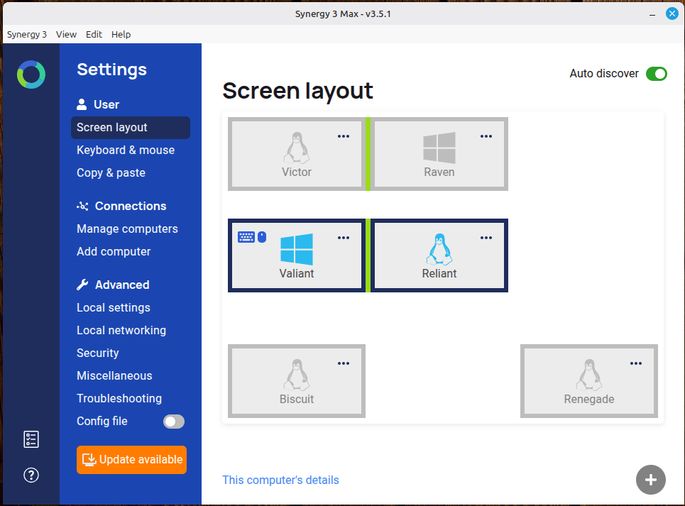
This is Synergy 3's main screen. Each rectangle represents a computer.
You know how sometimes the most useful things lay in the background?
That's how it is with Synergy by Symless. I have been using Synergy on and off for a couple of decades. Sometimes I just didn't need it, but over the last few years, Synergy has been a daily driver in both work and hobby.
Synergy lets me use one keyboard and mouse with as many computers as I need. I run Synergy in the background on each machine, and then configure them on Synergy's main screen so they form a contiguous block. I only need to do that once on one machine, and the others adjust their Synergy configuration to match.
Synergy communicates over the LAN, and is as well-behaved on WiFi as it is hardwired. Of course, hardwired is always better. That's a duh factor.
Once I decide what mouse and keyboard I want to be using, then I designate the computer to which they are connected as the primary. A little mouse and keyboard appear on its representation on the main screen. You can see that on the Valiant rectangle above.
This may not sound like much.
It is, however. In real life, Valiant has an array of four displays, and Reliant has three (it's an MSI Creator laptop with two external displays). So Synergy gives me a seven-display workstation with a single vertical mouse and mechanical keyboard.
Valiant is a Windows machine, and Reliant is Linux Mint. Victor is the Linux Mint partition in a dual-boot setup with Valiant. Raven is a Windows partition in a dual-boot setup with Reliant.
Biscuit is Linux Mint on a Dell Optiplex on my test bench, and Renegade is Linux Mint on a 2016 Dell 2-in-1 Inspiron laptop. The point of spelling all that out is to illustrate how effortlessly I can combine these machines into a multi-headed workstation to fit whatever operational need I am feeling at the moment.
I can have Valiant and Raven, with a side of Renegade if I choose. That would allow two instances of AutoCAD on the two Windows machines, with email, Signal and AgentDVR on the Linux laptop with an external monitor plugged into it. That may sound silly, but it is actually quite nice. Nine displays and one keyboard.
And That's Not All!
Synergy also lets me use the clipboard to copy/cut on one machine and paste on another. To be honest, there are times that doesn't work, but it works well enough to keep me happy. It is a go-to feature all day long.
The people at Symless have been really good as well. There have been times I've wanted some insights about something that cropped up, and they have always been quick to reply and effective with their advice. I have no complaint at all.
If you wish you could use more than one machine at a time without having to stretch to reach another keyboard, you really should give Synergy a try. You just may find, as I have, that Synergy is a thing that works. And that's why I keep using it, day after day after week after year.
(This is an article I wrote because I wanted to share a tool that works. I received no consideration from Symless, nor did they ask me to write this.)